Anti-detectdetection protection
Aim assist and auto dodge for Brawl Stars
JirGear is a third-party Brawl Stars client for Android. Aim assist, auto dodge and your own in-match menu.
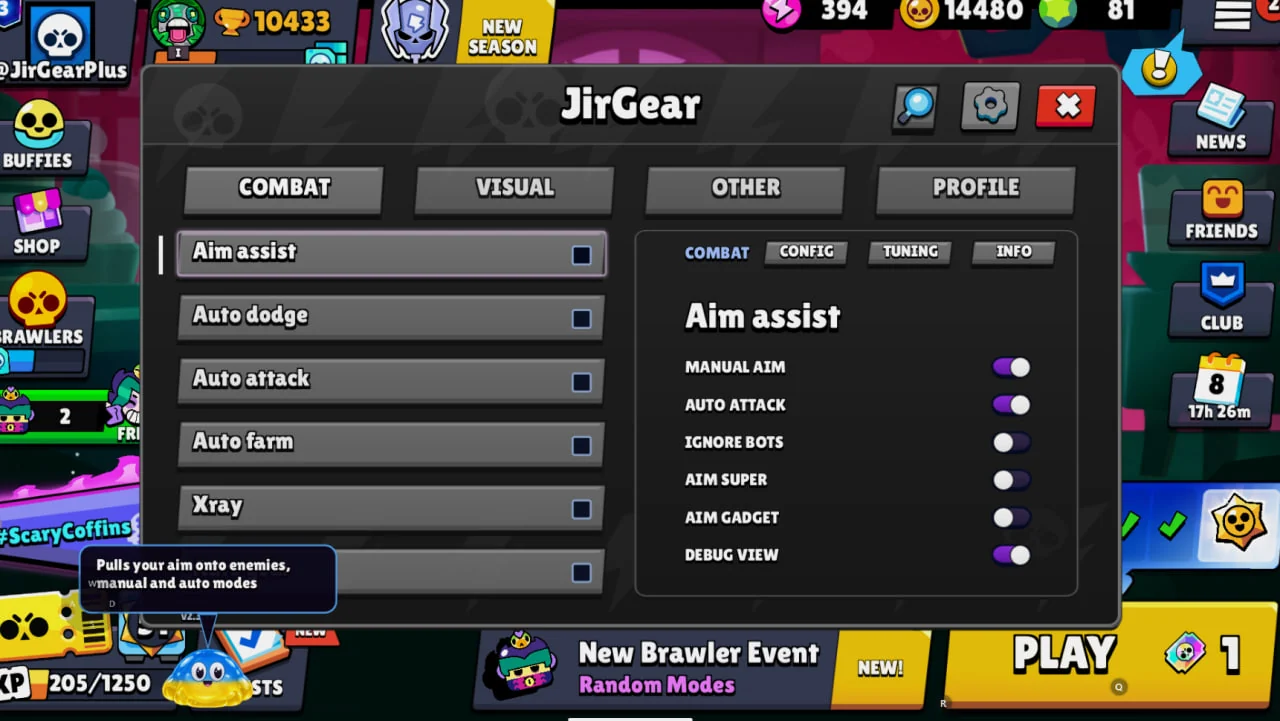
Features
JirGear features for Brawl Stars
Select a feature to see what it adds to your game.
Try another name or choose All.
Combat
Aim assist
What it does
Helps you land shots more accurately. Supports basic attacks, supers and gadgets, with manual and automatic modes.
Combat
Auto dodge
What it does
Helps you avoid enemy attacks. Useful against projectiles and danger zones on the battlefield.
Combat
Auto attack
What it does
Attacks opponents automatically during battle. Can also use supers and gadgets.
Combat
Auto farm
What it does
Plays matches automatically with your selected brawlers. Includes brawler and tactic selection, plus match statistics.
Combat
Xray
What it does
Lets you choose a target for automatic attacks. You can switch the selected target during battle.
Combat
Auto goal
What it does
Helps you score in ball and puck modes. Supports different ways of shooting at the goal.
Combat
Hold to fire
What it does
Lets you keep firing by holding the attack button. You do not need a separate tap for every shot.
Combat
Auto critical hit
What it does
Helps Kaze and Shade land critical hits. Adds critical-hit assistance for these brawlers.
Combat
Mortis chain
What it does
Helps Mortis hit multiple opponents with one super. Especially useful when several enemies are close together.
Combat
Mina chain
What it does
Helps Mina hit multiple opponents with one super. Helps make better use of her super in team fights.
Combat
Super chain
What it does
Helps supported brawlers hit multiple opponents with one super. Supports Mandy, Gale, Colt, Sam and Vince.
Combat
Shade combo
What it does
Helps you perform Shade ability combos. Combines attacks, gadgets and supers.
Combat
Janet mode
What it does
Keeps Janet’s attack charged. Makes her attack easier to use alongside auto attack.
Combat
Gray mode
What it does
Gives you more freedom when aiming Gray’s super. Gives you more freedom when choosing where to use the ability.
Combat
Nani steering
What it does
Lets you move while Nani’s super is active. Helps you stay mobile while controlling Peep.
Combat
Nani auto gadget
What it does
Automatically uses Nani’s defensive gadget when you are in danger. Helps protect you from a dangerous hit.
Combat
Auto hyper
What it does
Automatically activates a ready hypercharge. Removes the need for a separate hypercharge tap during battle.
Combat
Lumi auto recall
What it does
Automatically recalls Lumi’s morning stars. Makes her returning attack easier to use.
Combat
Disable auto aim
What it does
Disables the game’s standard auto aim. Lets you aim without the game’s built-in assistance.
Combat
Hold super
What it does
Keeps a ready super held for use. The super stays under your control and does not fire automatically.
Combat
Super indicator blink
What it does
Adds a blinking effect to the super indicator.
Combat
Hide super aiming
What it does
Hides super aiming from other players.
Combat
Hide aim
What it does
Hides your attack aim from other players.
Combat
Hide attack preparation
What it does
Hides super and gadget preparation.
Combat
Hide gadget
What it does
Hides preparation of a next-attack gadget.
Combat
Hide hyper
What it does
Hides hypercharge preparation.
Combat
Start battle now
What it does
Lets you start the next match sooner from the results screen. Reduces waiting between matches.
Combat
Auto start battle
What it does
Automatically readies up for the next match. Lets you continue a series of matches without repeatedly readying up.
Combat
Anti AFK
What it does
Helps prevent disconnection for inactivity.
Combat
Follow player
What it does
Automatically follows an opponent.
Combat
Auto spin
What it does
Automatically spins your brawler in place. You can choose the spin speed.
Combat
Spin while charging
What it does
Adds aim spinning while charging an attack. Movement remains available while charging.
Combat
Emotes
What it does
Adds a custom battle emote wheel. Gives quick access to emotes during a match.
Combat
Repeat pins
What it does
Automatically repeats pins.
Combat
Repeat sprays
What it does
Automatically repeats sprays.
Visuals
Aim damage
What it does
Shows damage values in the aiming interface. Helps you read damage values without looking away from your aim.
Visuals
Ball trajectory
What it does
Shows the ball’s flight path. Helps you judge the direction and outcome of a shot.
Visuals
Player markers
What it does
Helps you spot players with on-screen markers. Includes indicators for players outside the visible area.
Visuals
Attack range
What it does
Shows players’ attack ranges. Helps you judge your distance from opponents.
Visuals
Collision outlines
What it does
Shows player hitbox outlines. Makes the area you can hit easier to see.
Visuals
Highlight Leon clone
What it does
Helps you identify Leon’s clone. Makes the clone easier to distinguish from other characters.
Visuals
Enemy ammo
What it does
Shows opponents’ remaining ammo. Helps you judge whether an enemy is ready to attack again.
Visuals
Teammate HP
What it does
Shows your teammates’ health. Helps you track your team’s condition during battle.
Visuals
Respawn timer
What it does
Shows the time until your teammates respawn. Helps you see when your team will be back at full strength.
Visuals
DPS counter
What it does
Shows your damage per second. Helps you compare the damage output of attacks and brawlers.
Visuals
Player trophies
What it does
Shows players’ trophy counts. Adds trophy information above player names.
Visuals
Real names
What it does
Shows players’ real nicknames.
Visuals
Hide names
What it does
Hides other players’ names from the battle screen. Helps reduce visual clutter on screen.
Visuals
Local nickname
What it does
Lets you change the nickname shown only on your screen. Does not change the name on your game account.
Visuals
Friend markers
What it does
Highlights friends during battle. Helps you identify familiar players more quickly.
Visuals
Gadget recharge
What it does
Shows gadget recharge times. Adds information about ability readiness.
Visuals
Super and hypercharge
What it does
Shows super and hypercharge charge levels. Lets you see how close these abilities are to being ready.
Visuals
Safe shield timer
What it does
Shows the safe shield’s remaining duration. Helps you keep track of when the objective’s protection ends.
Visuals
Opponent list
What it does
Shows the number of visible opponents still alive.
Visuals
Disappear markers
What it does
Marks where opponents disappeared from view. Helps you stay aware after losing visual contact.
Visuals
Last seen position
What it does
Shows an opponent’s last known position. The last marker remains a useful reference on the map.
Visuals
Trap markers
What it does
Marks traps and danger zones. Helps you notice hazardous parts of the battlefield.
Visuals
Shahed drone
What it does
Lets you change the visuals of Peep’s flight. Includes flight camera, effect and interface styling.
Visuals
Camera
What it does
Lets you customize the game camera view. Includes view and camera-height adjustments.
Visuals
Wider camera
What it does
Gives you a wider view of the battlefield. Lets you see more of the area around your character.
Visuals
Camera shake off
What it does
Removes camera shake.
Visuals
Hide borders
What it does
Removes black bars around the battle screen.
Visuals
Hide HUD
What it does
Hides the battle interface. Gives you a cleaner view of the battle.
Visuals
Anti fade
What it does
Removes character fading.
Visuals
HUD editor
What it does
Lets you customize the layout and appearance of game controls. Movement, attack and super controls can be customized separately.
Visuals
Chroma nickname
What it does
Adds shifting colors to your nickname. You can choose the colors and transition speed.
Visuals
Change skins
What it does
Lets you change brawler appearances with skins. The selected look appears in the lobby and in battle.
Visuals
Cards and pins
What it does
Expands your choice of cards, pins and profile cosmetics. Lets you customize your player card and emote slots.
Visuals
Background / GIF
What it does
Lets you use your own image or GIF as the lobby background. Supports static and animated backgrounds.
Visuals
Skip highlights
What it does
Skips post-match highlights. Lets you reach the match results sooner.
Visuals
Skip prestige
What it does
Skips the prestige level-up animation.
Visuals
Skip animations
What it does
Skips box-opening and reward animations. Keeps the final reward summary visible.
Visuals
FPS Counter
What it does
Shows the current frame rate. Helps you monitor how smoothly the game runs.
Visuals
Coordinates
What it does
Shows your character’s coordinates. Adds map-position information to the game screen.
Visuals
Movement speed
What it does
Shows your character’s movement speed. The value is shown in tiles per second.
Visuals
Server tick rate
What it does
Shows the server update rate.
Visuals
Ping
What it does
Shows your connection latency during battle. Helps you notice connection problems during a match.
Visuals
Connection indicator
What it does
Shows the connection status indicator.
Visuals
Server address
What it does
Shows the current battle server address.
Tools
Battle servers
What it does
Lets you choose a region for new matches. Also lets you check connection latency.
Tools
Disable VSync
What it does
Removes the game’s standard frame-rate limit. Actual smoothness depends on your device’s capabilities.
Tools
Utilities
What it does
Adds room management tools for administrators.
Tools
Online status
What it does
Lets you change the online status shown to friends. Includes status choices for the lobby, battle and other states.
Tools
Hide spectator icon
What it does
Hides the switch to spectating in your player status.
Tools
Uncensored team chat
What it does
Lets you use team chat without the usual censorship.
Tools
Future events
What it does
Shows upcoming game events. Adds them to the event selection list.
Tools
Room information
What it does
Shows extra information about room members.
Tools
Remove room bots
What it does
Lets you remove bots from your friendly room. Helps you prepare the room for your chosen participants.
How do I get started with JirGear?
Sign in to your account with Telegram, choose a subscription and download the Android build from your profile. Approve your device request in the same account.
Where are the official links?
Channel: @JirGearPlus. Store: @JirGearPayBot. Support: @JirHelpBot. Check the official JirGear links. Updates are published in the channel.
What should I know about my game account?
We guarantee anti-detect for the modification inside the game: Brawl Stars’ built-in checks don’t detect it. We can’t protect you from manual checks — if other players report you and a Supercell moderator reviews your matches, your account may be restricted or banned. To avoid drawing attention, play carefully: you can hide your aim and attack preparation in the menu. JirGear is a third-party modification, not an official Supercell product. Read the terms of use before purchasing.
How can I pay?
Prices are in JG Coins: 1 ⭐ = 1 JG. Top up with Telegram Stars, SBP or crypto (Crypto Bot, xRocket). If you are short of JG for a plan, you are offered to pay the difference — in the Mini App the plan activates on its own right after payment. You see the amount before confirming.
What do I do after buying?
After buying, @JirGearPayBot sends you a link to the private group — the APK is there. The link works for 24 hours; the “Private group” button in the bot gives you a new one. You can also download the APK in your account on the website. Then install JirGear and link Telegram in the game.
How many devices can I connect?
A subscription covers one device. Add one or three more with slots for 30 days while your subscription is active.
Does the subscription renew automatically?
No, there is no auto-renewal. The bot reminds you 3 days and 1 day before the end and on the last day — renew in the Mini App or in your account.
Is there an iPhone version?
No. JirGear runs on Android — on a phone or in an Android emulator on a computer.
The mod stopped working after a game update — what about my subscription?
Your subscription time pauses and resumes once the JirGear update is out. News is posted in @JirGearPlus.